Check iPhone Storage before deciding what to do.
More life in the phone you love
Full phone?
Don’t replace
it just yet.
If your iPhone still does what you need, start with the clutter. A few practical steps can make room for more of the good stuff.
Still using an iPhone 11, 12, 13 or 14?
You’re in the right place.

We grew up making things last
One phone.
The whole household.
The phone in the hallway. Taking turns. Stretching the cord for a private chat. A phone was something you kept for years. If yours still works for you, it’s worth finding out what a good clear-out can do.
Screenshots, unused apps and large videos are good places to begin.
Let the app group photo clutter so you can review it calmly.
Start with what’s taking up space
Your phone may have more to give.
Years of photos, repeated saves, old screenshots and forgotten videos add up. They can fill a perfectly useful phone.
Open Settings → General → iPhone Storage to see what is using space. Then tackle a little at a time.
Take me through the easy winsIllustrative storage example
iPhone Storage
Almost fullPhotos, videos, apps and more
MessagesAppsPhotos / VideosSystem
Full storage tells you there’s less room.
It doesn’t, by itself, mean it’s time for a new phone.
When you’d like a helping hand
Meet FreeUp Space. Your photo clear-out, made simpler.
The app helps with photo and video clutter. It brings things together so you can choose what stays, without sorting through everything on your own.
Scan your library
FreeUp Space checks your photos and videos on your device.
Review clear groups
See duplicates, similar shots, screenshots, and large videos in plain categories.
Confirm the cleanup
You get a final review screen before any deletion or optimization happens.
Inside FreeUp Space
The app, just as you’ll see it.
Compare the photos. Choose what stays. Take each cleanup at your own pace.
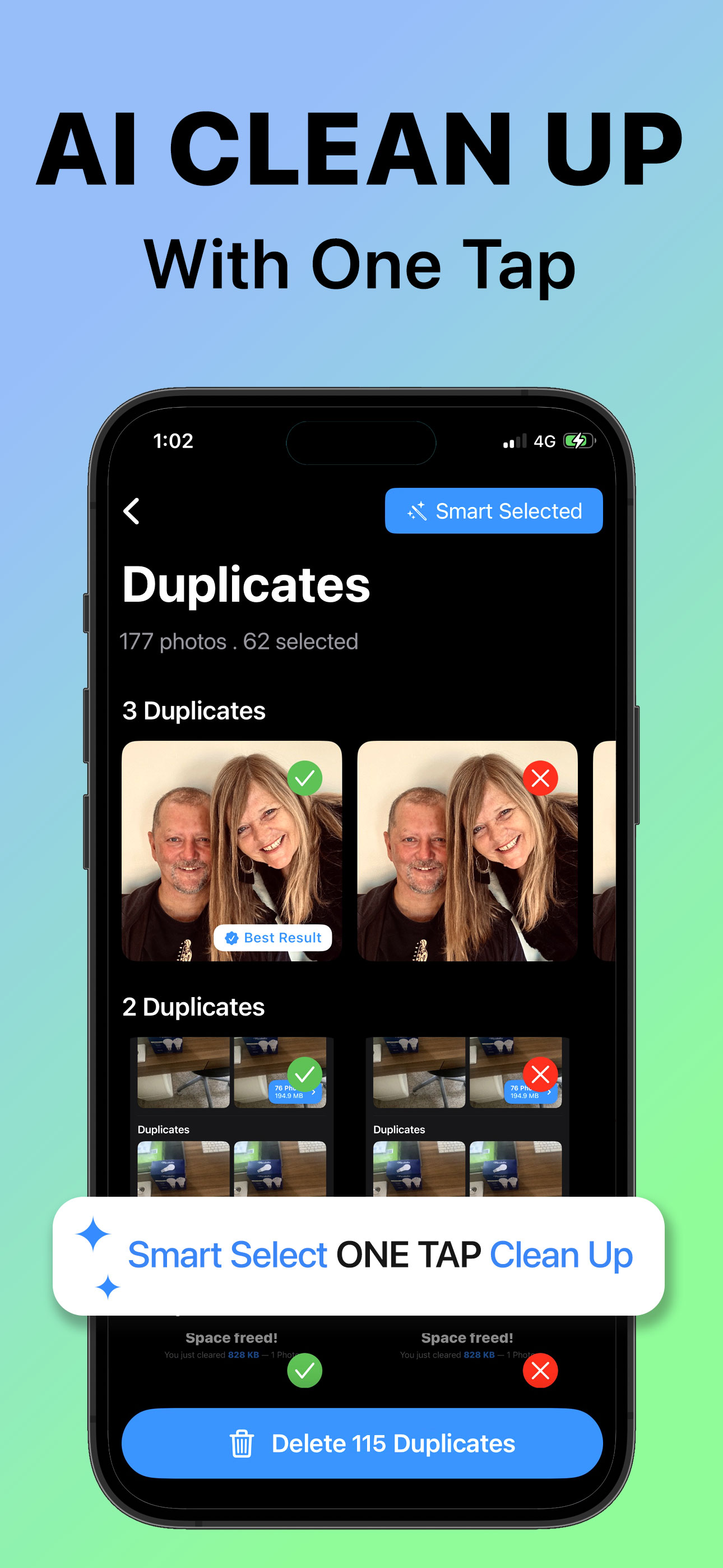
Review grouped photos and choose what to remove.
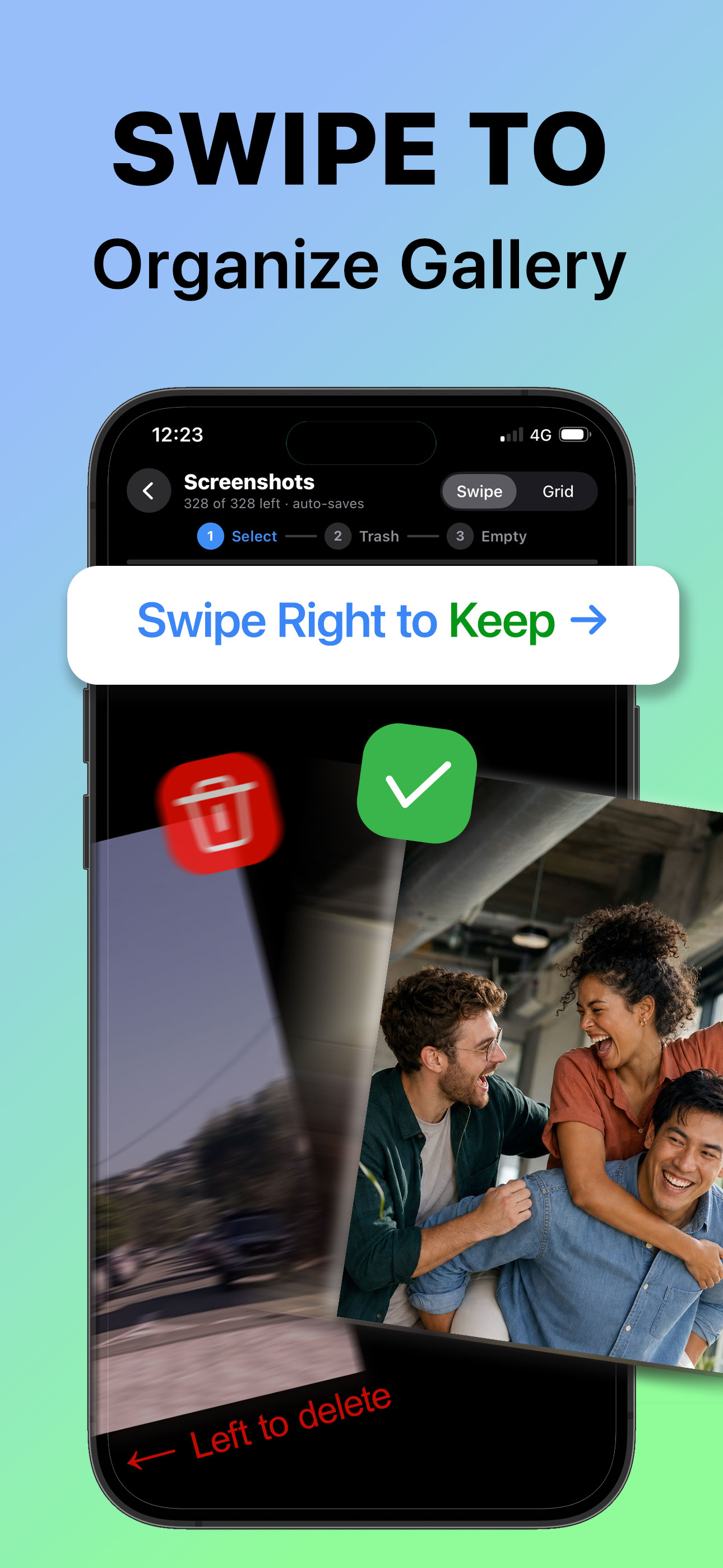
Swipe right to keep. Swipe left to select for deletion.
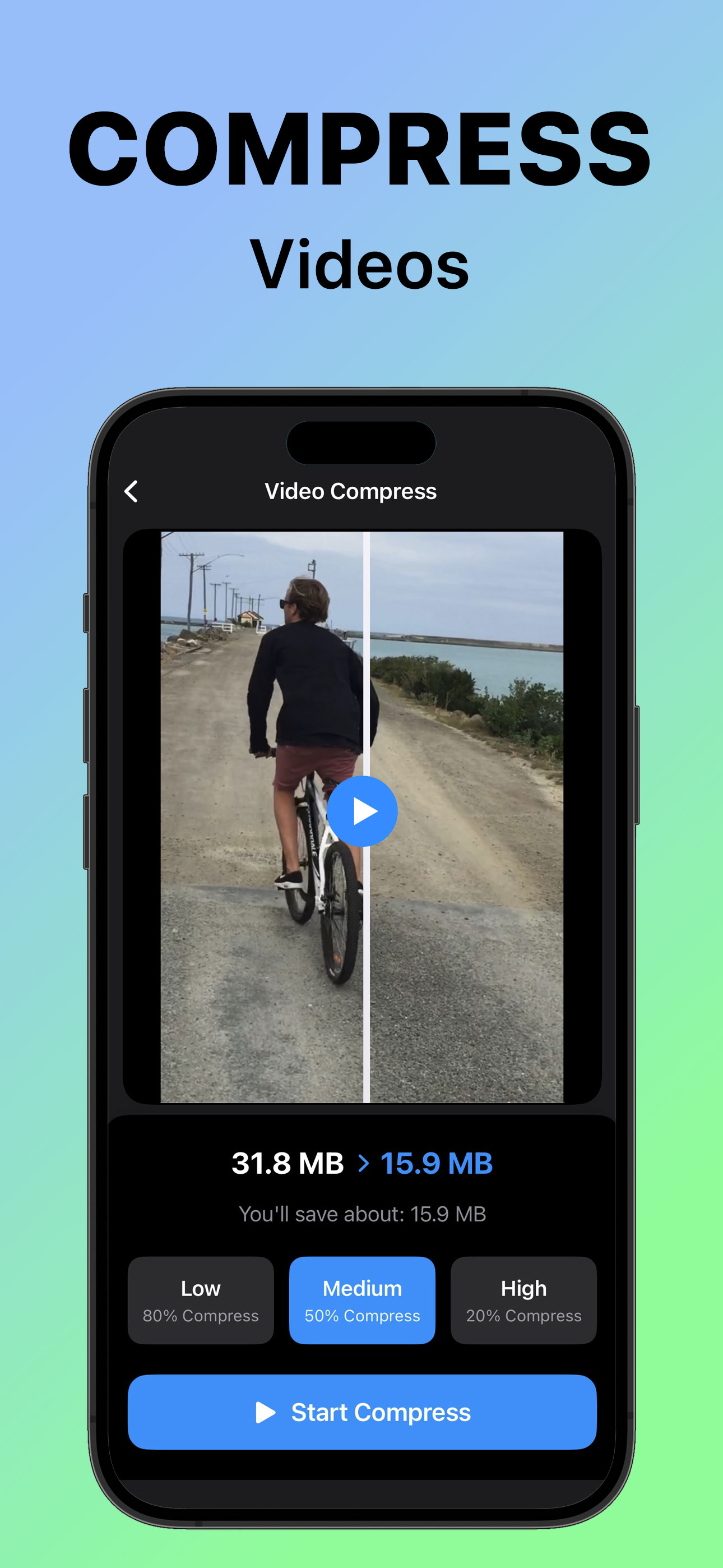
Compare the preview and choose a compression setting.
Screens from the FreeUp Space App Store presentation. File counts and savings shown are examples; your library will be different. Select a screen to view it larger.
Feature rich, still easy
Smart enough to be useful. Simple enough to trust.
Duplicate detection
Finds exact copies and repeated saves so you can keep one good version.
Exact copies · photo example
One memory. Three copies.
Similar photo groups
Helps compare burst shots, repeated selfies, and near-identical moments.
Similar photos · photo example
Screenshot cleanup
Rounds up old screenshots, memes, and temporary saves that pile up quietly.
Screenshots
Blur detection
Surfaces accidental blurry photos that are easy to miss in a large library.
Accidental shots · photo examples
Review each photo. Keep anything that matters.
Video optimization
Sorts big videos by size and offers quality choices before compression.
Video compression · playable example
Compare the same video at 9.6 MB and 1.3 MB. Savings and quality depend on the video and settings.
Try it at your pace
Review for free. A one-time purchase unlocks cleanup, with no subscription. Check the App Store for the current price.
Privacy first
Your photos stay on your phone.
FreeUp Space is designed around on-device processing. There is no account requirement, no cloud upload for scanning, and no cleanup without your confirmation.
Support
A few things you might be wondering.
Need a hand with the app?Email FreeUp Space supportTell us your iPhone model, iOS version and what you were trying to do. Please leave out private photos or sensitive details.
Does full storage mean I need a new iPhone?
Not necessarily. If your phone still does what you need, reviewing storage is a sensible first step. Clearing clutter can free space; it does not repair a worn battery, broken hardware or change software support.
Can I start without buying an app?
Yes. You can check storage, offload unused apps and review photos with the tools already on your iPhone. Our useful tips show where to start. FreeUp Space can help organise the photo and video review.
Does FreeUp Space delete anything automatically?
No. The app is designed around review and confirmation, so you choose what is removed or optimized.
Are my photos uploaded somewhere?
No cloud upload is needed for scanning. The cleanup process is designed to run on your iPhone.
What if I am not sure about a group?
Skip it. Freeing space is useful, but keeping photos you care about matters more.
Where can I get help?
Email support at support@freeup.space and include your iPhone model, iOS version, and what you were trying to clean.
Why can the app see only some of my photos?
FreeUp Space can only work with the photos you allow it to access. You can review the app’s Photos permission in iPhone Settings. Only grant the access you are comfortable with.
Why hasn’t my storage changed after deleting photos?
Photos may still be in Recently Deleted. Apple normally keeps them there for 30 days. Only empty it once you are certain — permanently deleted items cannot be recovered from there.
Keep the good stuff
Years of life on your phone. Room for what comes next.

The family photos. The dog videos. The moments you’re glad you caught.
A good clear-out makes room around your memories. Take your time with anything that matters.FreeUp Space for iPhone
A little room for the next chapter.
Get to know FreeUp Space, review what it finds, and keep using the phone you’re comfortable with. Check the App Store for compatibility and current purchase details.
Download on the App Store